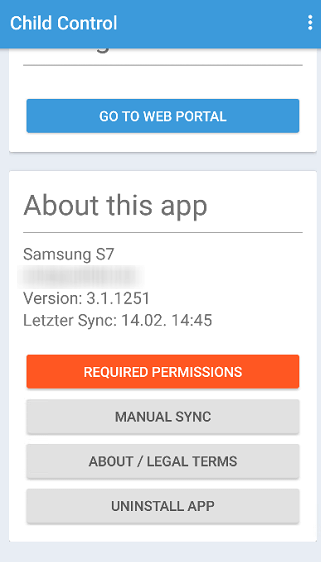
Required Permissions
To ensure that Child Control is working properly, it is important that Android rights (permissions) are
set. These permissions are device administrator, access to usage data, enabled accessibility services
and the permission to display via other apps. You have already defined all these permissions during the
setup of the app. However, it is possible that these rights were changed later via the Settings app.
Also on some devices it unfortunately happens that active energy-saving modes deactivate accessibility
services. If a particular permission is no longer available, it will be displayed in the Web Portal on
the start page. In this case, pick up the child’s device and start the Child Control App. When scrolling
down, a “Required Permissions” button should appear in the “About the app” section. Select this button
to reactivate the permissions on the children’s device. If you reactivate accessibility, a restart is
then required on some devices. It may take some time for the warning message to disappear from the web
portal.
If you suspect that the permissions were intentionally deactivated via the App settings and/or an
energy-saving mode, you can optionally lock the settings on the device and/or activate hack protection.
Feel free to get in touch with us via the
Contact page if you cannot resolve the issue on yourself.