
Fortnite’s parental controls are not in the game. They live in the Epic Games account, and everything hangs on a six-digit PIN. This guide covers the six settings that matter, in order: the PIN, chat permissions, friend request approval, payment authorisation, time limits and the age ratings on individual islands.
It also names the three blind spots most guides skip: the PIN does not cover purchases made through the PlayStation Store or Xbox Store, it does not cover spending of V-Bucks already bought, and it does not touch console party chat.

Fortnite is not only a shooter. It is also a social network, a creation platform and a shop, and each of those raises a different question for a parent.
The good news: Epic Games offers a far more complete set of controls than most families use. The less good news: they sit in the Epic account rather than in the game, and three important things escape them entirely.
The short version
Everything starts with a six-digit PIN created in the Epic account. It governs chat, friend requests, payments and age ratings.
Chat permissions are capped by the declared age: Friends Only at most under 10, Friends, team members and connections at most under 13.
Three blind spots: the PIN covers neither purchases made through the PlayStation Store or Xbox Store, nor spending of V-Bucks already bought, nor console party chat.
Yes, and they reach further than most parents realise. The settings live in the Epic Games account and apply to Fortnite, Rocket League and Fall Guys, whichever platform your child plays on.
There are two ways in: the Epic account portal in a browser, or the parental controls section inside Fortnite. Meaningful changes require the PIN.
Fortnite is rated PEGI 12 in Europe and Teen, 13 and over by the ESRB in North America. Those ratings describe the content of the game, not the people your child meets in it, which is exactly what the settings below are for.
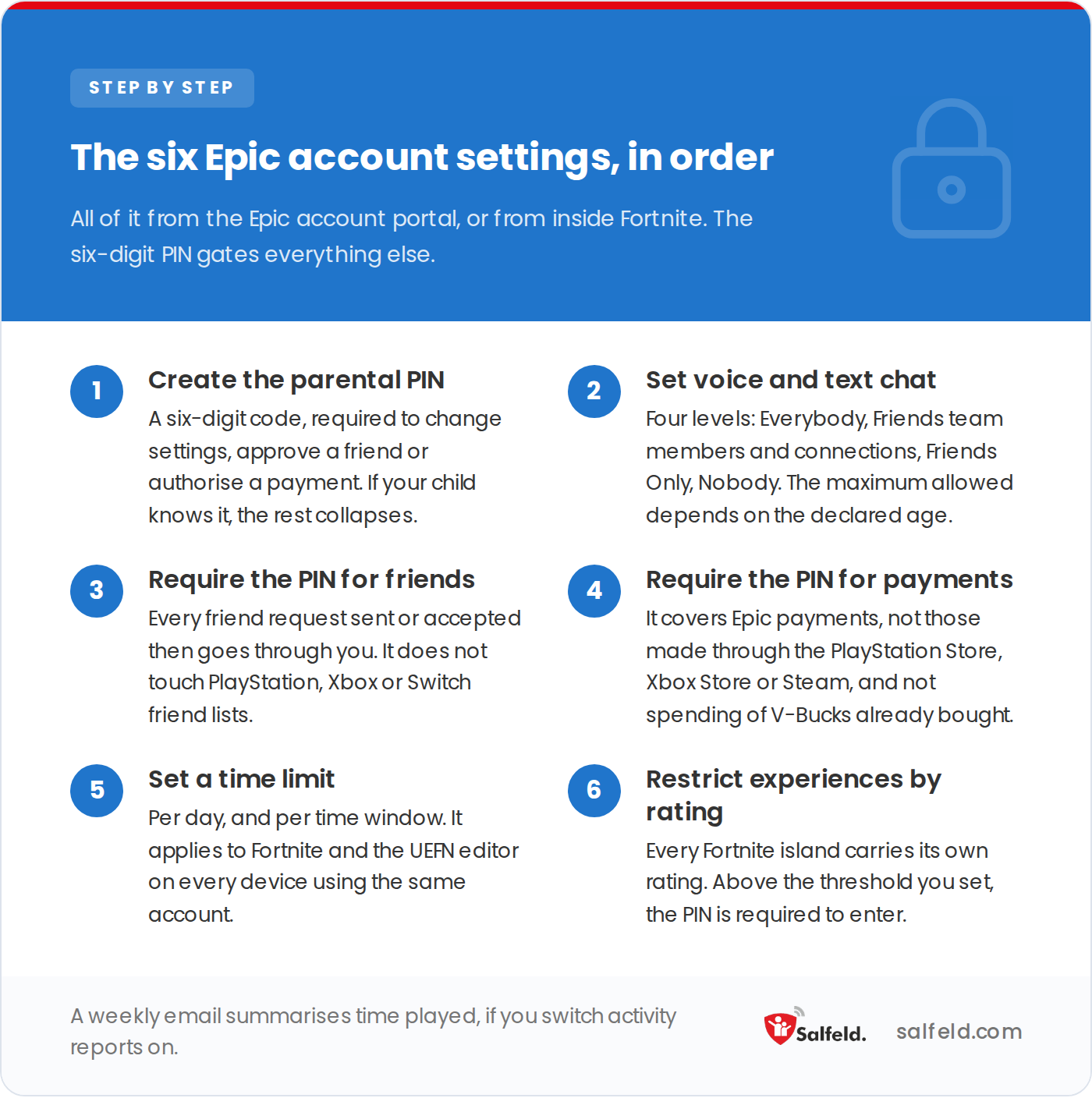
The order matters: without the PIN created first, none of the five settings after it holds.
A six-digit code. It is required to change settings, approve a friend request, authorise a payment, or unlock an island rated above your threshold.
It is the single point of failure for the whole setup. If your child knows the PIN, they can undo all of it.
Epic offers four levels, for voice and for text alike:
Even on Nobody, standard in-game phrases such as “Nice one!” still get through. Turning voice chat on also turns voice reporting on, which keeps a rolling five-minute audio buffer on the device, sent to Epic only if someone reports a violation. That reporting stays on at all times for players under 18.
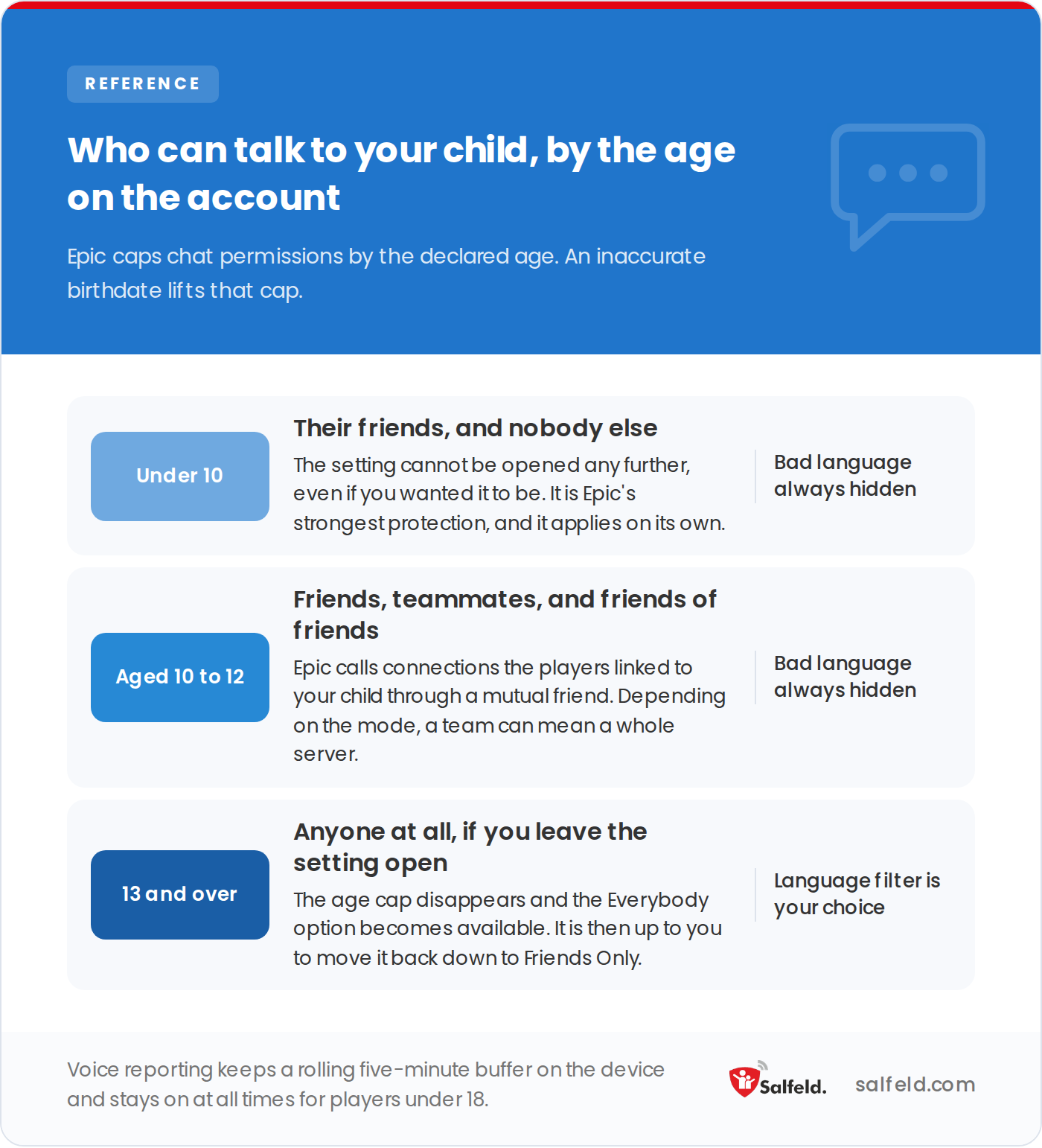
This is why a fake birthdate at sign-up is expensive: it removes the cap entirely.
Every request sent or accepted then goes through you. Note that this does not touch platform friend lists: a child can still add someone on PlayStation, Xbox, Steam or Switch.
It covers payments made with Epic’s own payment service. It does not cover purchases through the PlayStation Store, Xbox Store, Steam or the Nintendo eShop, and it does not cover spending of V-Bucks already bought.
Two further guardrails exist:
Two forms, which can be combined: a daily total, and time windows during which play is allowed.
Your child gets a warning thirty minutes before the end. The limit applies to Fortnite and to the UEFN editor, and it follows the account across every device. You can allow your child to request more time, which sends you an email with a link to grant it or not.
This is the least known setting and one of the most useful. Every Fortnite island, including those built by other players, carries its own IARC rating. You set a threshold, and any island above it requires the PIN.
A neighbouring setting decides whether your child can use Creative mode and the UEFN editor. Worth knowing: while building, a player can see content that has not yet been submitted for moderation, and is therefore unrated.
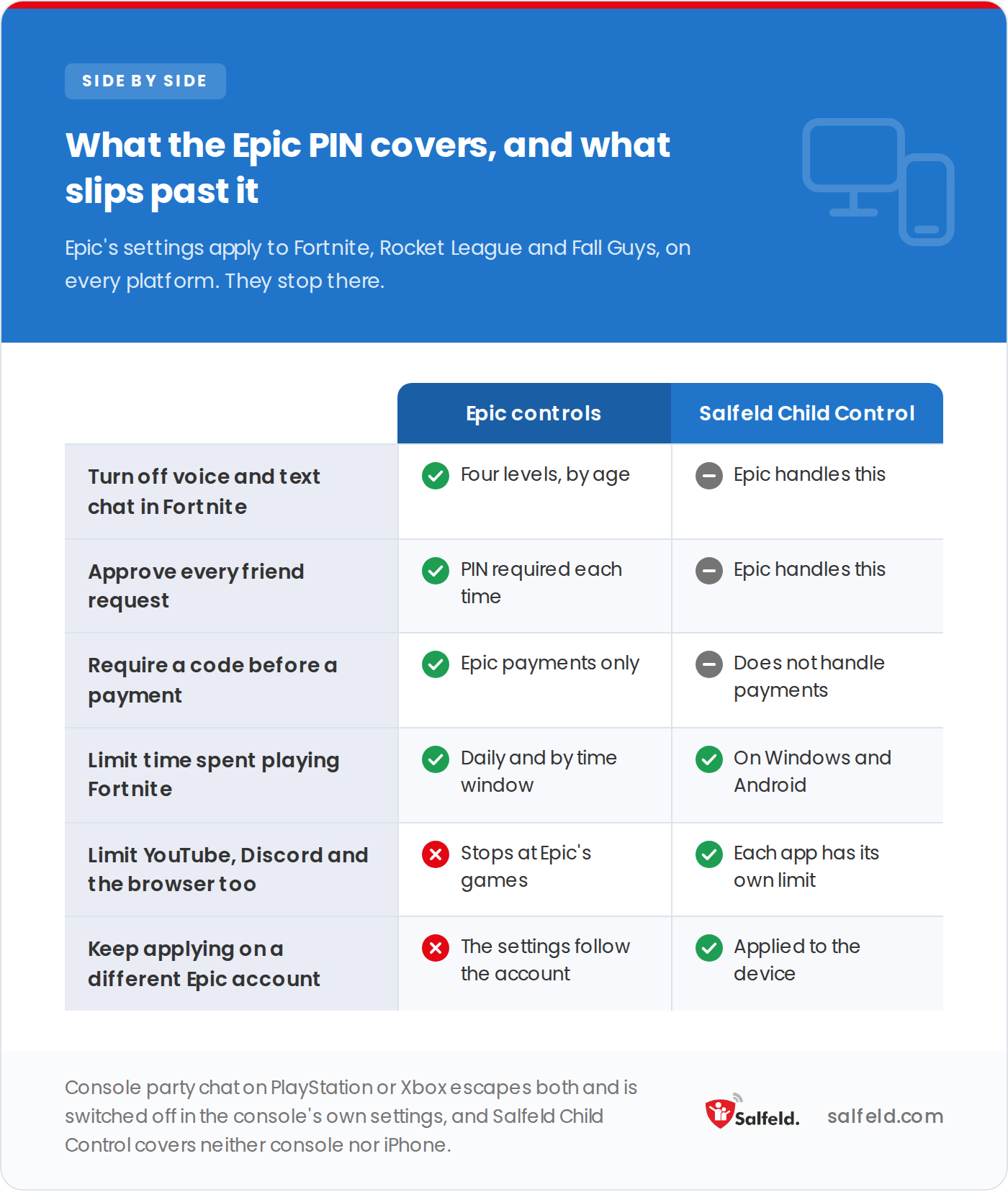
The table below carries the same rows in text, which is the version screen readers and search engines can read.
| What you need | Epic controls | Salfeld Child Control |
|---|---|---|
| Turn off voice and text chat in Fortnite | Yes, four levels by age | Epic handles this |
| Approve every friend request | Yes, PIN required each time | Epic handles this |
| Require a code before a payment | Yes, Epic payments only | Does not handle payments |
| Limit time spent playing Fortnite | Yes, daily and by time window | Yes, on Windows and Android |
| Limit YouTube, Discord and the browser too | No, stops at Epic’s games | Yes, each app has its own limit |
| Keep applying on a different Epic account | No, the settings follow the account | Yes, applied to the device |
Console party chat. Turning chat off inside Fortnite does not stop your child talking through the PlayStation or Xbox party system. That setting lives in the console’s own menus, not in Epic’s.
Payments outside Epic. A V-Bucks purchase made through the PlayStation Store or Xbox Store bypasses the Epic PIN. Spending limits then have to be set on the console side.
The rest of the screen. Epic’s settings stop at Epic’s games. They say nothing about YouTube, where many children spend as long watching Fortnite as playing it, or about Discord, where the sessions get arranged.
Disclosure: Salfeld makes Salfeld Child Control, a parental control app, and publishes this blog.
On Android and Windows, Salfeld Child Control sets time limits per app, Fortnite included, blocks apps during homework and bedtime, and filters websites. Because it acts on the device, it keeps applying even if your child signs in with a different Epic account.
One honest caveat: it runs on neither console, iPhone nor iPad. If your child plays on PlayStation, Xbox or Switch, Epic’s settings and the console’s own controls are your only levers.
Try Salfeld Child Control free for 30 days
Epic manages Fortnite. Salfeld Child Control manages the rest of the device: time limits per app, blocking during school and sleep, website filtering. Start a free trial on Android and Windows.
In the Epic Games account, not in the game. There are two routes: the Epic account portal in a browser, or the parental controls section inside Fortnite. Meaningful changes require a six-digit PIN that you create first.
In the Epic account’s chat permissions, choose Nobody or Friends Only. Note that this does not switch off console party chat: on PlayStation or Xbox your child can still talk through the console’s own system, which is set separately.
No. It covers payments made through Epic’s payment service. It covers neither purchases made through the PlayStation Store, Xbox Store, Steam or the Nintendo eShop, nor spending of V-Bucks already bought. A separate setting decides whether your child can spend V-Bucks on items with a random reward.
Yes. The Epic account allows a daily total and time windows, with a warning thirty minutes before the end. The limit covers Fortnite and the UEFN editor, and follows the account across devices. To limit YouTube or Discord as well, you need a control installed on the device.
PEGI rates Fortnite 12 in Europe, and the ESRB rates it Teen, meaning 13 and over, in North America. Those ratings describe the game’s content. The real question is your child’s readiness for voice chat and for spending, both of which are set independently.
These settings change over time. Exact labels may differ by game version and platform.
We aim to publish guides that are genuinely useful, but the interfaces and settings described here change often. If a step no longer works, or if anything here is wrong, tell us and we will correct it.