Children on a terrace with a tablet

The parent app for Salfeld Child Control

Most of the time you do not need the full web portal. You need one number — how long has my child been on the phone today — and one decision: grant a little more time, or not.

That is what the parent app is for. It shows you the day at a glance and lets you act on it in two taps. It is free, needs no licence of its own, and you may put it on as many devices as you like.

On Android it is a real app, installed from the download page — and only there do you also get a notification when your child asks for extra time or for a site to be unblocked. On iPhone and iPad it installs as a web app: open the login page in Safari, tap Share, then Add to Home Screen. From then on it sits on the home screen and opens like any other app.
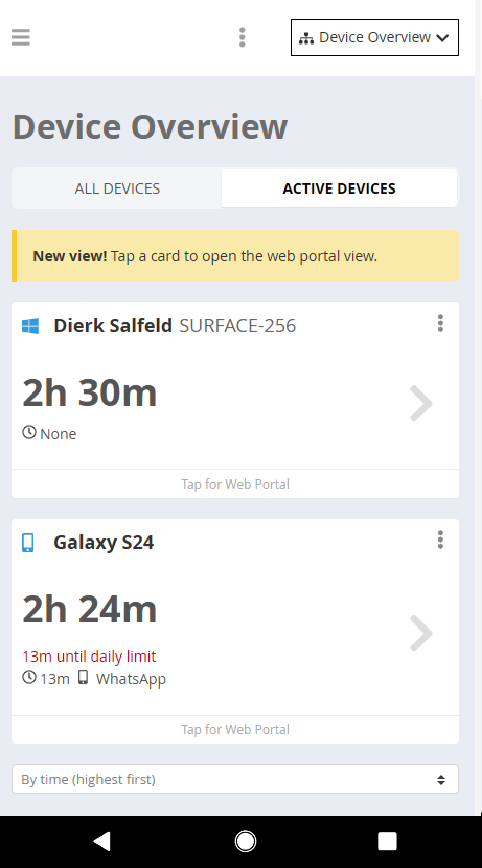
The device overview in the Salfeld parent app

What the parent app shows you at a glance

The main screen shows the device your child is using, the time counted today, and — if the device belongs to a roaming account — the shared time across all of their devices. Underneath you see whether an extension is currently running and which program was used last.

From the same screen you can grant an extension, lock the device or release it again. If you have several children or several devices, Show all devices lists them together.

And nothing is missing. Tap a card and you are in that device's settings — every one of them, because the parent app is the web portal, only with the overview placed in front of it. Time limits, web filter, app rules, reports, unlock requests: all of it, from your phone, with no second login.

That is the difference to sitting down at the computer for every small decision. The question that actually comes up in the evening — has my child already used up today's time, and do I want to add fifteen minutes — is answered in the time it takes to unlock your phone. And when you do want to change a rule properly, that is two taps further, not a different tool.


Installing the parent app takes a minute

On Android you install the parent app exactly like the child app, from the download page. Use the same login you already use for your child's devices, and choose parent device instead of child device during installation. That is the whole difference — and it is what lets the app notify you when a request comes in.

On iPhone or iPad there is no App Store version, and you do not need one. Open the Salfeld login page in Safari — it has to be Safari — tap the Share icon and choose Add to Home Screen. The parent app then behaves like an installed app. What runs on your own phone says nothing about your child's devices, by the way: Child Control itself needs Android or Windows there.

Or without installing anything at all: the parent app is a view inside the web portal. Open the portal in any browser and switch to it through the three-dot menu next to the device selection.

It needs no licence and costs nothing, on as many devices as you like. Step-by-step screenshots are in the Parent App chapter of the manual, the iPhone route in the iOS FAQ.

Making everyday digital life safe

Children use the PC and their own phone with great enthusiasm — for chatting, playing, watching videos and looking things up for homework. A day without the internet is barely imaginable any more, for them or for us. But as rich and varied as the web is, just as many risks and age-inappropriate corners are waiting behind them.

Salfeld Child Control creates a safer environment on your child's phone and PC. Filter categories, keywords and individual addresses decide what is allowed and what is not, and time limits decide for how long. Installation takes a few steps on any Android device or Windows PC, and from then on you can be reasonably sure your child stays on pages that suit their age, without stumbling into unsuitable content or paid downloads.

The parent app is what keeps that manageable. Rules that nobody checks are quickly forgotten — and rules you have to open a computer to check get checked less often than they should.
Salfeld Child Control

About Salfeld

Salfeld has been working on child and youth protection software since the late 1990s. Alongside the technical side, knowing what the internet actually does to family life has always played a central role — which is why the parent app exists at all: it is the part of the product parents touch every day.

Child Control creates a safe environment on Windows PCs and Android devices: time limits, web filtering, app control, and reports that tell you what actually happened. For Android phones and tablets the protection runs as an app, on Windows as a program. Everything is developed continuously and shaped by what parents ask for.

It is a one-time purchase rather than a subscription, with a 30-day free trial and a 30-day money-back guarantee. The parent app is free on top of it, on as many devices as you like.

Free 30-Day Trial

No credit card needed. Ends automatically.

Download Pricing Features